


CBC News: Breaking & Local
4.61.91K Reviews
App Specs
- Version
- 7.11.0
- Updated On
- License
- Free
- Downloads
- 1,000,000+
- Developer
- Canadian Broadcasting Corporation
- Categories
- News & Magazines
- Platform
- Android
Screenshots


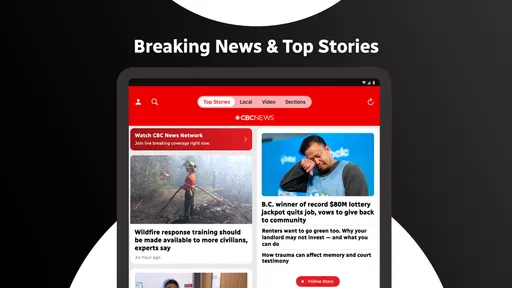
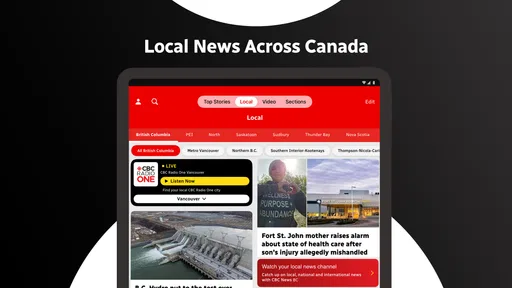
 Analysis by AppCompare
I use news apps differently from news websites: I want a quick sense of what matters, a way to open the stories worth my time, and enough national and international context to avoid living inside a narrow local bubble. CBC News: Breaking & Local is built for that routine. It comes from the Canadian Broadcasting Corporation and sits in the News & Magazines category, with a focus that covers national, world, and sports news.
My overall impression is that this is a practical choice for readers who want a Canadian news home base rather than an endless stream of headlines from everywhere. It is free, rated 4.7 on average from around 87,000 ratings, and has passed one million installs. Those figures suggest a mature, widely used app, but they do not remove the need to decide whether its editorial focus matches your habits. The important question is not simply whether it is popular; it is whether you want CBC’s way of organizing the day’s news.
What I looked for before making a recommendation
When I judge a news app, I start with four practical questions. Can I understand the main story quickly? Can I move from a headline to useful context without getting lost? Does the app serve my location and interests, or does it make me work to filter irrelevant material? Finally, can it replace my usual mix of browser bookmarks, television clips, and notification panels without becoming another source of noise?
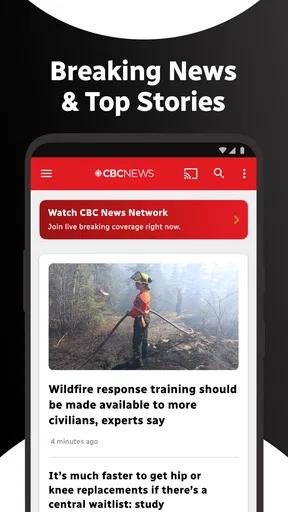
CBC News does well when the answer depends on a Canadian perspective. The app is not merely a generic international headline reader. Its identity comes from the CBC newsroom, so the value is strongest for someone who wants Canadian public-interest coverage alongside world and sports sections. If your daily reading starts with federal politics, Canadian communities, national events, and stories interpreted through a Canadian lens, that focus is a meaningful reason to try it.
I also considered how much effort the app asks from a casual reader. Most people do not open a news app with a research plan. They check it while having breakfast, waiting for a train, or trying to understand a developing story before work. A good experience should make those short visits useful without forcing the reader to build a complicated system of saved topics and custom feeds.
That is where the app’s broad scope matters. National, world, and sports coverage give it a sensible starting point for a general reader. You can use it as a single daily check-in instead of jumping between several publications. At the same time, a broad news app will not satisfy everyone. Readers who want only local municipal reporting, only business news, or only a highly personalized collection of sources may prefer a more specialized tool.
The first-day routine I would suggest
After installing it, I would not begin by turning on every alert or trying to read everything. I would open the major sections first and notice which stories repeatedly earn my attention. That simple test tells you whether CBC’s editorial mix suits you. If the lead stories feel relevant and the world or sports coverage gives you useful variety, the app can become a dependable front page.
Worth Reading Before You Choose

EA SPORTS FC Mobile 26 Is a Bigger Football Game, but It Takes Time

Flipboard Shows What News Apps Must Do Beyond the Feed

Switching to Android Auto Means Rethinking Your Driving Routine

Google Calendar Makes a Crowded Week Easier to Manage

Ludo King Makes the Most of the Minutes Between Plans

Baby Panda World Brings Quick Play to Modern Phones, but Its Game Library Feels Busy
A useful habit is to separate “I need to know this now” from “I want to understand this later.” Breaking developments deserve a quick glance, but longer stories are better saved for a calmer moment. Treating every headline as urgent is the fastest way for any news app to become tiring, and CBC News is more useful when you use it as a guide rather than a constant alarm.
Where CBC News earns its place
The clearest strength is its Canadian identity. Many news aggregators are excellent at collecting stories but weak at giving readers a coherent sense of which Canadian developments deserve attention. CBC News starts from a newsroom that is closely associated with Canada, so the app feels more purposeful for someone whose main concern is what is happening across the country and how it connects to the wider world.
I especially like the way this makes the app suitable for a “morning briefing” workflow. I can scan the leading stories, open one or two that affect my day, then move to international coverage for context. Sports adds another reason to return without requiring a separate application. That combination is more useful than a single-topic reader for people who want one familiar destination.
Another advantage is the low financial barrier. The app is free, which makes it easy to test without committing to a subscription. That matters for students, occasional readers, and anyone comparing several news sources. You can install it, use it for a normal week, and decide whether its coverage deserves a permanent place in your routine rather than paying first and evaluating later.
The app is also a good fit for readers who prefer a publication with an identifiable editorial voice over an anonymous collection of links. An aggregator may show more sources, but that variety can make the reading experience feel fragmented. CBC News gives you a clearer starting point. You are choosing a particular Canadian news organization, not just an algorithmic pile of headlines.
That choice brings a subtle benefit when a story develops quickly. Instead of seeing several nearly identical links from unrelated outlets, you can follow the way one newsroom builds its coverage. For a reader who values continuity, that is less distracting. I find it easier to remember the important details when the app’s coverage feels like a connected news report rather than a series of disconnected alerts.
Small workflow choices that improve the experience
My first practical tip is to use the app in two passes. On the first pass, scan headlines and identify only the stories that could change your plans or understanding of the day. On the second, return to the most important item and read it with more attention. This prevents sports updates, international events, and minor breaking items from competing equally for your focus.
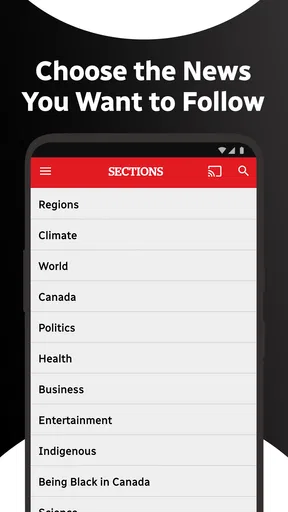
My second tip is to treat sections as filters, not obligations. The presence of world and sports news does not mean you need to read every section on every visit. If you are checking Canadian news before work, stay with the national material first. If you have more time later, use the other sections to widen your view. The app works better when you decide the order instead of letting the feed dictate it.
A third useful approach is to compare the headline with the full article before forming an opinion. Short news labels are designed for scanning, while the article usually supplies the qualifications and background that a headline cannot. This is particularly important with developing stories, where the first version may be updated as more information becomes available. CBC News is most valuable when you use it to read beyond the first line.
There is also a practical benefit for people who have recently moved, travel frequently, or live away from their original Canadian community. A national source can help maintain a connection to the country while still offering broader coverage. It will not replace a truly local source for street-level details, but it can provide a stable national frame that local social feeds often lack.
What the numbers tell me, and what they do not
The app has been available since February 19, 2011, and its current version is 7.11.0. I read that as evidence of a long-running product rather than a short-lived experiment. Its age also means the app has had time to become part of established reading habits, which is reassuring if you want a news tool that is likely to remain familiar over time.
Its content rating is Teen, and the minimum operating system is Android 7.0. That makes it accessible to many older Android devices while still setting a clear age classification for the store. Families should still remember that news can include upsetting or mature subject matter even when an app is broadly suitable for teenagers. The rating is a useful guide, not a promise that every headline will be comfortable.
The developer is the Canadian Broadcasting Corporation, so the app’s strongest reason to exist is editorial rather than technical novelty. I would not choose it because I expect a news app to behave like a social network or a highly configurable dashboard. I would choose it because I want CBC’s coverage in a convenient mobile format.
Where another type of news app may fit better
CBC News is not automatically the best choice for every reader. If your priority is maximum source variety, a general aggregator may suit you better. Aggregators can place newspapers, broadcasters, specialist publications, and independent outlets in one stream. That flexibility is useful when you are researching a subject or comparing how different organizations frame the same event.
The trade-off is that more sources usually mean more sorting. You may see repeated versions of one story, conflicting headlines, or articles that assume very different levels of background knowledge. CBC News is narrower, but that narrowness can make the daily reading decision easier. I would pick an aggregator for breadth and comparison; I would pick CBC News for a more consistent Canadian starting point.
A local newspaper app may be better if your central question is what is happening on your street, in your municipality, or in a particular regional community. National coverage can tell you why an issue matters across Canada, but it may not provide the detailed local reporting you need for school closures, council decisions, neighborhood changes, or nearby events. In that situation, CBC News works well as a companion, not necessarily as a replacement.
People who mainly follow business, finance, technology, entertainment, or a single sport may also find a specialist app more efficient. CBC’s broad mix is its appeal, but broad coverage means less room for deep attention to one subject. A dedicated publication can be the better tool when your work or interests demand specialist analysis throughout the day.
There is another important distinction between a news app and social media. Social feeds can surface eyewitness material and very fast reactions, but they also make it harder to judge context, repetition, and reliability. CBC News is a better first stop when you want a newsroom-organized account. Social platforms may still be useful for discovering what people are discussing, but I would not use them as my only way to understand a developing event.
Limitations worth accepting before you switch
The main limitation is editorial fit. If you dislike CBC’s tone, priorities, or selection of lead stories, the app will not become satisfying simply because it is free. A clean interface cannot compensate for coverage that does not match your interests. I recommend testing it during an ordinary week, not only during a major event when almost any news source feels compelling.
Another limitation is the tension between speed and depth. A mobile news app has to help you scan quickly, but serious stories often need time and context. If you want long-form reading every time you open the app, a newspaper-style publication may feel more rewarding. CBC News is more convincing as a daily news companion than as a complete replacement for every kind of journalism.
Notifications can also change the character of the experience. Breaking news alerts are useful when you genuinely need immediate awareness, but they can turn a calm reading routine into a series of interruptions. My advice is to be selective: keep alerts only if they help you make decisions or follow an important story. Otherwise, opening the app on your own schedule is less stressful and usually more deliberate.
Finally, readers outside Canada should consider relevance before installation. World news gives the app wider reach, and sports can make it useful beyond Canadian headlines, but the central identity remains Canadian. If your daily needs are centered on another country, an app rooted in that country’s reporting will probably serve you better. CBC News is not trying to be a borderless replacement for every national newsroom.
The cost of changing your daily news habit
Because the app is free, the financial cost of switching is low. The real cost is attention. Every new news app asks you to learn its rhythm, decide which sections matter, and determine whether its alerts improve your day or interrupt it. That is why I would add it gradually rather than immediately replacing every source you already use.
For a week, I would use CBC News as the first check of the morning and keep one familiar alternative available for comparison. Notice whether you are finding genuinely different information or simply reading the same stories twice. If CBC gives you a clearer Canadian overview, it may replace part of your routine. If the second app supplies specialist depth or local detail, keeping both may be more sensible than forcing one application to do everything.
Switching also has a knowledge cost. If you are accustomed to a personalized aggregator, CBC’s editorial selection may initially feel less tailored. That is not necessarily a weakness; it is a change from “show me more of what I already follow” to “show me what this newsroom considers important.” I prefer the latter when I want to avoid an overly narrow information bubble, but readers who need strict topic control may feel constrained.
For families or shared devices, the Teen content rating makes the app easier to consider than an explicitly adult-only service, yet I would still explain to younger readers that news stories can involve difficult events. The app can support media literacy when used together with a habit of reading full articles, checking dates, and distinguishing confirmed reporting from early developments.
Who should install it first
- Canadian general-news readers who want national coverage with world and sports material in one place.
- People who prefer a recognizable broadcaster over an anonymous headline aggregator.
- Occasional readers who want a free app for a quick daily briefing.
- Readers who want to reduce dependence on social feeds for understanding major events.
I would be more cautious if your priority is hyperlocal reporting, specialist financial analysis, a completely custom multi-source feed, or news from another country. In those cases, CBC News may still be a useful second source, but it should not be your only installation simply because it is well known.
My recommendation after using it as a daily reader
I recommend CBC News: Breaking & Local to anyone who wants a straightforward Canadian news starting point and does not need every story filtered through a personal algorithm. Its combination of national, world, and sports coverage gives it a sensible everyday role, while the free price makes trying it nearly effortless. The long-running app, current 7.11.0 release, and strong 4.7 average also make it feel like an established choice rather than an untested newcomer.
My clear advice is to use it as your Canadian front page, not as your entire news universe. Pair it with a local source if municipal detail matters, or with a specialist publication if your work depends on deep coverage in one field. That approach respects both the app’s strength and its boundaries.
What I like most is the balance between focus and range. CBC News gives me a coherent place to begin, but it does not trap me inside one narrow subject. What I like least is the same thing viewed from another angle: readers who want total control over sources and topics may find its editorial structure less flexible than an aggregator.
For my own routine, that is an acceptable trade. I would open it for the morning scan, read the stories that affect my day, and return when a developing event needs more attention. If that sounds like the kind of news habit you want, this app is an easy recommendation. If you want a fully personalized research dashboard or highly local specialist reporting, choose a different primary tool and keep CBC News as a useful complement.
Pros
- Offers reliable Canadian national and local news coverage.
- Live updates help users follow developing stories quickly.
- Includes regional content for more relevant local reporting.
- Clean interface makes browsing headlines straightforward.
- Supports video and audio content alongside written articles.
Cons
- Some stories may require a stable internet connection to load fully.
- Push notifications can feel frequent unless carefully customized.
- Coverage is primarily Canada-focused for international news readers.
- Advertising may appear while browsing articles and video content.
- Certain features or content may vary by region and device.
FAQs for CBC News: Breaking & Local
What is CBC News: Breaking & Local?
CBC News: Breaking & Local is the official news app from the Canadian Broadcasting Corporation. It provides access to breaking news, national and international reporting, local coverage, politics, business, sports, entertainment, weather, and more. The app is designed for readers who want a convenient way to follow Canadian news and receive updates throughout the day.
Is CBC News: Breaking & Local free to download and use?
Yes, the app is generally free to download and use on supported Android and iOS devices. Most news articles, live updates, videos, and other core features are available without a subscription. However, mobile data charges may apply when using cellular networks, and some content or features could change depending on CBC’s current policies, regional availability, or future app updates.
Can I receive breaking-news notifications?
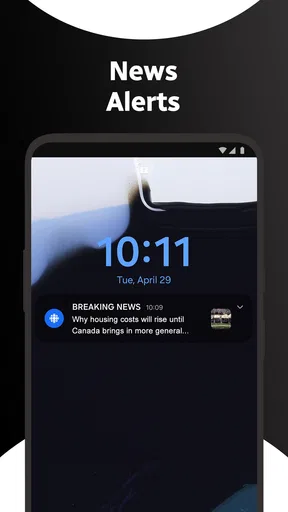
Yes, CBC News: Breaking & Local can send push notifications for important breaking stories and other updates. During setup, you can usually choose whether to allow notifications and may be able to adjust the types of alerts you receive later in the app or through your device settings. If you prefer fewer interruptions, notification permissions can be disabled at any time.
Does the app provide local Canadian news and regional coverage?
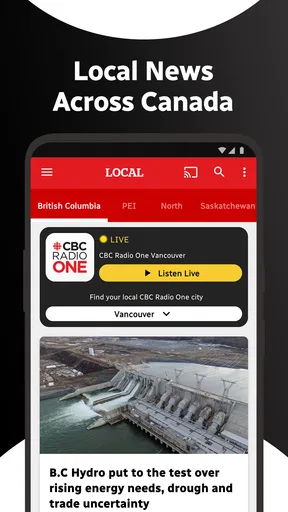
Yes, local and regional reporting is one of the app’s main advantages. Depending on your location and selected preferences, you can follow news from Canadian provinces, cities, and communities, in addition to national coverage. Available local content may vary by region, and users should review their location or edition settings to make sure the app displays the areas they care about most.
Can I watch videos or listen to live CBC news in the app?
The app includes multimedia content such as news videos, interviews, clips, and selected live or audio-related coverage when available. The exact options can depend on the story, your location, licensing restrictions, and CBC’s current programming schedule. Streaming video and live content can use significant mobile data, so a Wi-Fi connection may be preferable if you have a limited data plan.


